Loox automatically sends review request emails after each order - but there are times when you may want to exclude specific customers, products, or orders from receiving them. Whether it's a wholesale account, a subscription renewal, or a product you'd rather not collect reviews for, block-listing gives you full control over who gets a review request.
How to block-list an order, customer, or product
Block-listing works by adding a Shopify tag to the relevant order, customer, or product. Once the NOREVIEW tag is in place, Loox will skip sending a review request for any matching order.
- In Shopify, go to Orders, Customers, or Products- depending on what you want to block.
- Find the relevant order, customer, or product.
- In the Tags field, add the tag: NOREVIEW (in capital letters).
- Click Save.
Once saved, Loox will no longer send review request emails for that order, customer, or product.
Note: Block-listing an order takes effect immediately and stops that specific order from receiving a review request. Block-listing a customer or product only affects orders that are created or updated after the NOREVIEW tag is added - it will not retroactively apply to existing pending requests.
Exclude orders from Loox emails via Loox settings
You can also manage block-listing directly from your Loox settings, without having to tag orders one by one in Shopify.
- Inside the Loox admin, go to Settings > General > Email settings.
- In the Exclude orders from Loox emails field, add the Shopify tags you want to block.
- Press Enter after each tag to confirm it.
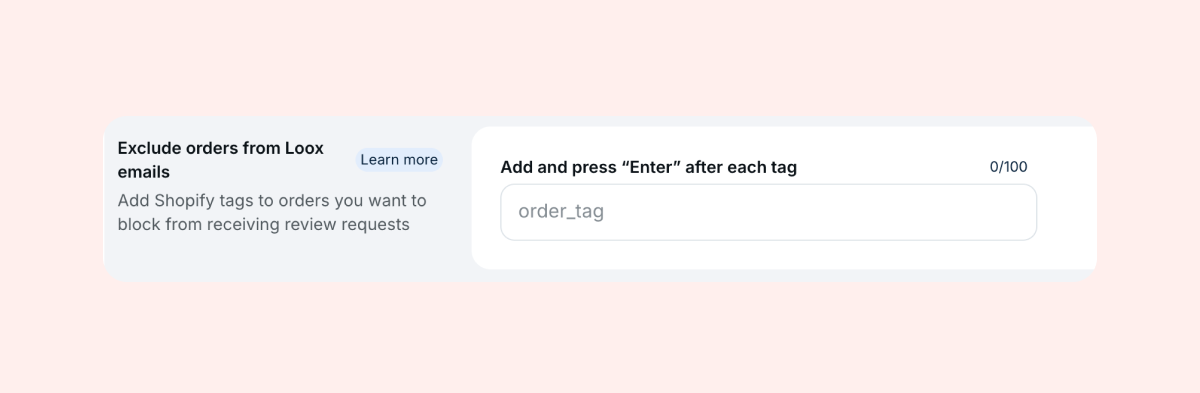
- Click Save.
Any order tagged with one of these values will be excluded from receiving Loox review request emails.
Note: To block multiple tags, separate each tag with a comma and no spaces - for example:
NOREVIEW,Subscription Recurring Order
Block-listing recurring subscription orders
If your store uses a subscription app, you may want to send review requests only on a customer's first order - not every recurring delivery.
You can use a third-party tagging app (such as Smart Tags) to automatically apply the NOREVIEW tag to recurring orders based on rules you define - for example, any order where the customer has ordered before.
If you'd like to set up tag-based block-listing for recurring orders on your store, contact our support team. We're happy to help configure this for you.
Note: This only applies to future orders. To stop existing pending orders from receiving a review request, you'll also need to manually add the NOREVIEW tag to those orders.
FAQs
Q: I added the NOREVIEW tag to a customer, but they still received a review request. Why? A: The NOREVIEW tag on a customer or product only applies to orders created or updated after the tag was added. It does not affect review requests that were already scheduled. If you need help removing pending requests, contact our support team.
Q: Can I block-list multiple tags at once? A: Yes. In the Exclude orders from Loox emails field in your Loox settings, add each tag separated by a comma with no space - for example: tag1,tag2.
Q: What if I want to re-enable review requests for a previously block-listed order? A: Remove the NOREVIEW tag from the order in Shopify and contact our support team to reschedule the review request.
If you have more questions, contact our Support team at [email protected]. We're available 24/7 and happy to help!
Was this article helpful?
That’s Great!
Thank you for your feedback
Sorry! We couldn't be helpful
Thank you for your feedback
Feedback sent
We appreciate your effort and will try to fix the article