
Every review request email Loox sends includes an opt-out option for shoppers. This keeps your store compliant with email regulations like CAN-SPAM and GDPR, and protects your sender reputation so your emails are more likely to reach the inbox.
This article explains how shoppers can unsubscribe, what happens when they do, and how promotional and transactional review request emails differ.
Promotional vs. transactional review request emails
Loox sends two types of review request emails, depending on whether a shopper gave marketing consent at checkout.
- Promotional emails - Sent to customers who gave marketing consent. These can include incentives like a discount for submitting a photo or video review.
- Transactional emails - Sent to customers who did not give marketing consent. These are compliant with consumer regulations and do not include promotions, discounts, or referral incentives.
Note: The transactional/promotional logic applies to Loox's own email sending only. If you send review requests via Klaviyo or Omnisend, this logic does not apply — those integrations will only be triggered when the email is promotional.
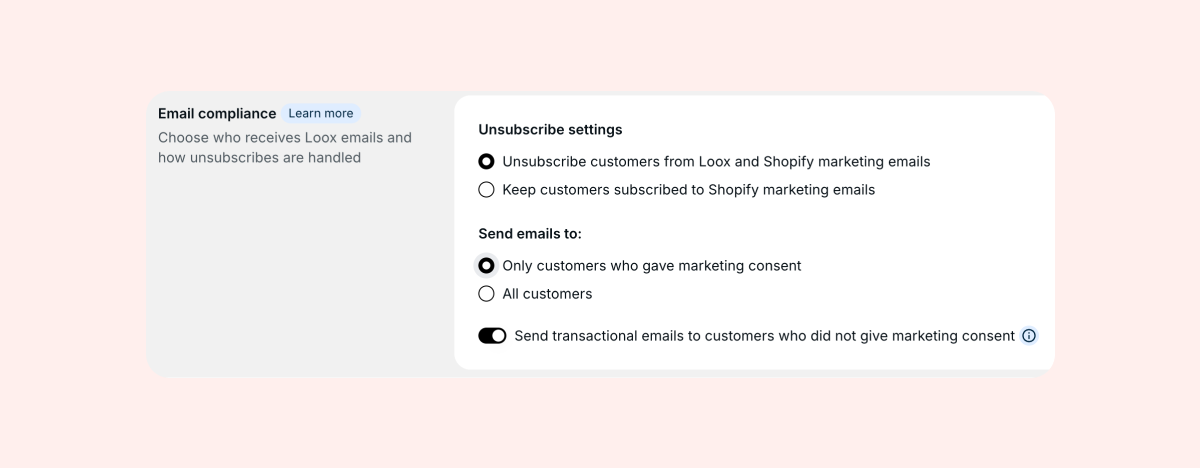
You can manage your email compliance settings and decide whether to send transactional emails to customers inside the Settings menu, under General > Email settings.
How a shopper unsubscribes
Shoppers have two ways to opt out of your Loox review request emails:
- The unsubscribe link in the footer of every review request email
- The one-click unsubscribe button that email clients like Gmail and Apple Mail display at the top of the message - this lets shoppers opt out without even opening the email
Both options work the same way, and will immediately unsubscribe the customer from Loox emails.
What happens when a shopper unsubscribes
As soon as a shopper opts out, Loox automatically:
- Stops all future review requests to that shopper from your store.
- Cancels any requests already scheduled for them, including reminders or postponed requests.
- Adds their email to your store's unsubscribe list, so they stay opted out going forward- even on future orders.
- Updates their status in Shopify - by default, Loox also marks the shopper as unsubscribed from your Shopify marketing emails.
You do not need to take any action. This all happens automatically the moment they unsubscribe.
A few things to keep in mind:
- Unsubscribes are tied to the shopper's email address, not their order. If the same shopper places another order from your store later, they will still be unsubscribed.
- By default, unsubscribing from Loox also opts the shopper out of your Shopify marketing emails. Learn more about adjusting this setting in the section below.
- Unsubscribing from Loox does not stop Shopify's own order and shipping notifications, which are transactional and sent by Shopify directly.
Choosing how unsubscribes are handled
You can decide whether a Loox unsubscribe should also opt the shopper out of your Shopify marketing emails.
Inside the Settings menu, go to General > Email settings and find the Unsubscribe settings section:
- Unsubscribe customers from Loox and Shopify marketing emails (default) - When a shopper opts out of Loox, Loox also marks them as unsubscribed from Shopify marketing emails, so their choice is respected across your store.
- Keep customers subscribed to Shopify marketing emails - The shopper only stops receiving Loox review requests. Their Shopify marketing subscription stays as-is.
Note: These settings give you flexibility, but it is your responsibility to make sure your email practices comply with the laws and regulations that apply to your business and your customers, such as CAN-SPAM, GDPR, and CASL. If you are unsure what applies to you, check with a legal advisor.
FAQs
Q: Will unsubscribing remove the shopper's existing reviews?
A: No. Unsubscribing only stops emails. Any reviews the shopper already submitted stay published on your store.
Q: Does an unsubscribe stop Shopify order and shipping notifications too?
A: No. Those are transactional emails sent by Shopify, not marketing emails. Unsubscribing from Loox only affects review request emails and, by default, your Shopify marketing emails.
Q: Will I be notified each time someone unsubscribes?
A: No. Unsubscribes are handled automatically and do not require any action from you.
Q: A shopper says they unsubscribed but still received an email. Why?
A: A request that was already in the process of being sent may still arrive. Going forward, no new requests will be sent to that shopper. Also check that they unsubscribed using the same email address tied to their order, since unsubscribes are matched by email address.
Q: Why didn't a customer receive a discount for their photo review?
A: If you have transactional emails enabled, customers who did not give marketing consent at checkout will receive a transactional review request instead of a promotional one. Transactional emails do not include discount incentives. If you believe this happened by mistake, check your Email compliance settings under Settings - General - Email settings.
If you have more questions, contact our Support team. We're available 24/7 and happy to help!