
The Collection Reviews Widget is available on all Loox plans.
Collection pages are where customers browse your catalog and decide which product to view next. The Collection Reviews Widget pulls reviews from all the products in the collection into one grid. This article covers adding the Collection Reviews Widget to your collection pages, the customization options available, and what your customers will see.
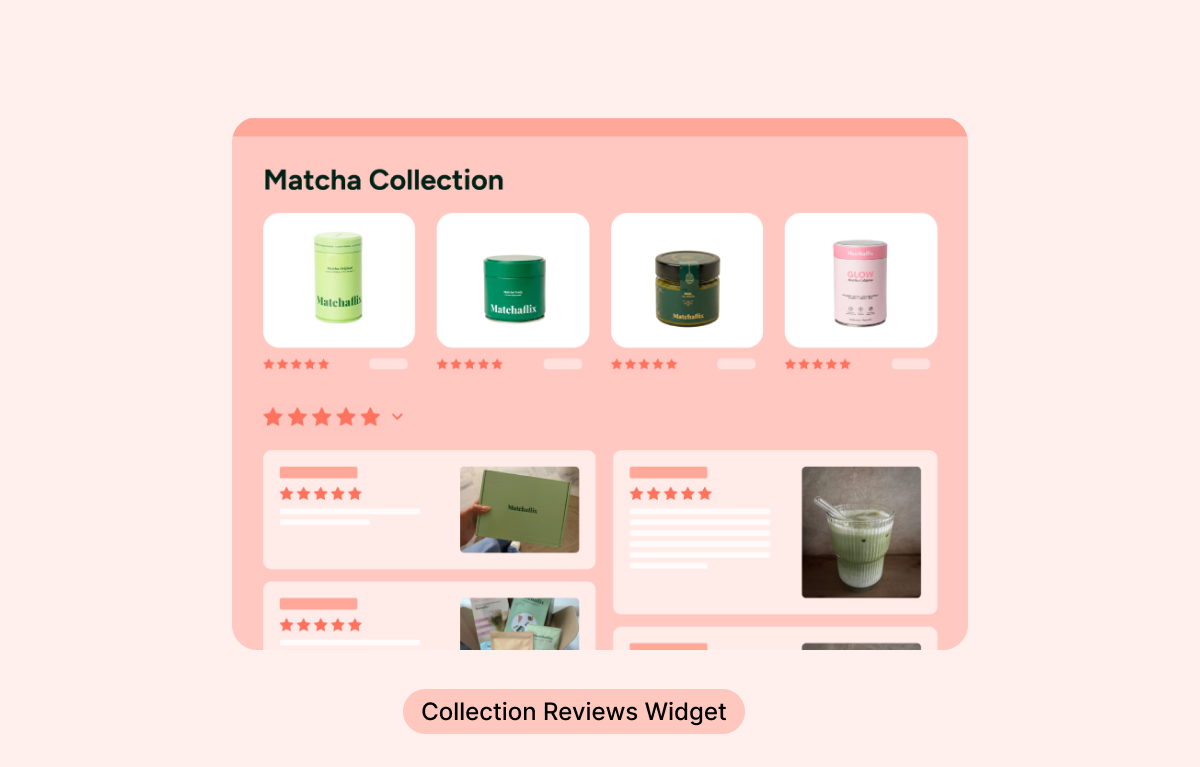
Why display reviews on your collection pages?
Customers on the collection page are still comparing options. Seeing real customer reviews of the products in front of them builds trust at that exact moment, before they click into a product page.
Because the widget automatically matches the reviews to the collection being viewed, a customer browsing your "Bestsellers" collection sees reviews of your bestsellers, and a customer browsing "New arrivals" sees reviews of your new arrivals - all in one widget block.
How to add the Collection Reviews Widget
To add the Collection Reviews Widget from the Loox admin:
- In your Loox admin, go to Widgets > Collection Reviews Widget and click Add to theme.
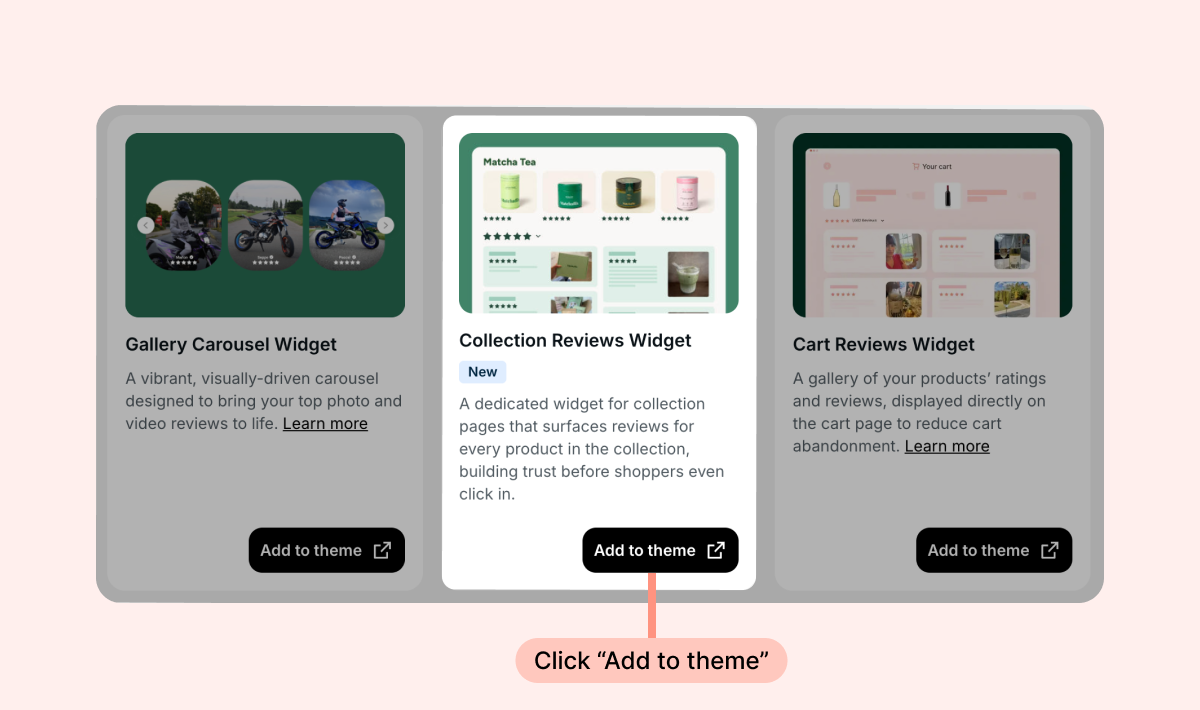
- The Shopify Theme Editor will open on your collection page with the widget installed, and you can drag and drop the widget's app block where you would like it to appear.
- Click Save.
You can also add the widget directly from the Shopify Theme Editor. Just open your collection page template and add the Reviews Widget app block:
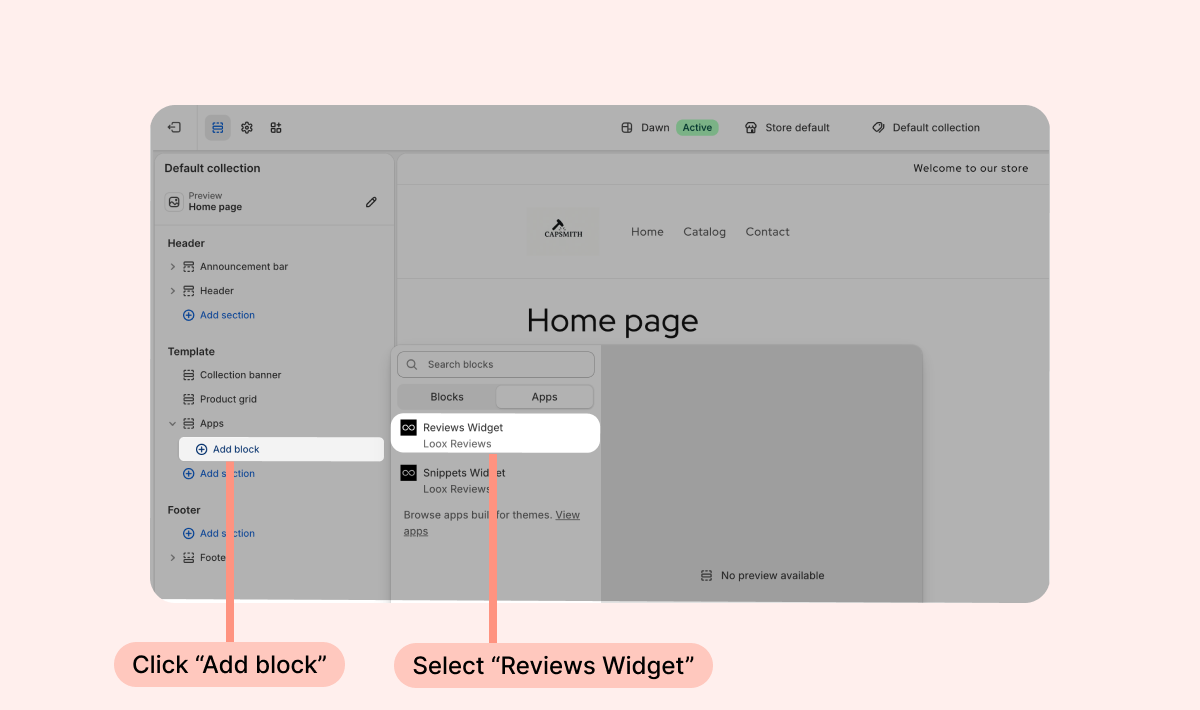
On collection pages, the app block automatically displays reviews from the products in that collection. Once you click Save, the widget goes live on every collection page that uses that template.
Customization options
The Collection Reviews Widget uses the same app block settings as the Reviews Widget. You can customize it via its app block in the Shopify Theme Editor:
- Reviews to display - Select Default (displays your featured reviews first, then product reviews, then store reviews), product reviews, store reviews, or product and store reviews. This will affect each app block individually.
- Main tab - Select which tab will be displayed first by default. When set to "Automatic", we will display product reviews first, but if no product reviews are available, we will automatically display store reviews instead.
- Display only reviews with photos - When checked, the widget will display only photo and video reviews. Text-only reviews will not be displayed.
- Show reviews from all products - Display reviews from all of your store's products instead of only the products in the collection.
- Number of reviews to display - Choose how many reviews to display on the widget before clicking on the "Show more reviews" button.
- Hide product thumbnails - Remove the associated product's picture and name below each review.
- Maximum width - Limit the width and the number of reviews displayed per row of the widget.
- Show sample reviews - Display sample reviews while you design your widget. Sample reviews are only visible in the theme editor and are shown when no reviews are available.
For additional design options, click Customize in Loox Editor at the bottom of the block settings to open the widget's live editor in the Loox admin, where you'll find many additional customization options.
What customers see
On each collection page, customers see a review gallery made up of reviews for all the products in that collection, including the reviewer's photos or videos, rating, and text. Each review shows the product it belongs to at the bottom, so customers can tell which product earned the praise.
Good to know
- Large collections: the widget displays reviews from the first 200 products in the collection. If those products are part of bundles or product groups, reviews from up to 1,000 products can be included.
- Featured reviews: reviews you tag as featured will appear at the top of the widget when Always show featured reviews is enabled in your Reviews Widget's settings.
FAQs
Q: I use the same collection template for several collections. Do I need to add the widget to each one?
A: No. Add the widget once to a collection template, and it automatically displays the relevant reviews on every collection page that uses that template.
Q: Why isn't the "Write a review" button displayed on my collection page?
A: The "Write a review" button appears only when the widget displays reviews of one specific product. When the widget displays reviews from multiple products, the button is not displayed.
If you have more questions, contact our Support team. We're available 24/7 and happy to help!