
Available on the Convert, Unlimited, and Legacy Scale and Growth Plans.
If you sell product bundles in your store, Loox can now automatically aggregate and display reviews from each individual product that makes up that bundle - all on the bundle page itself. Setup involves turning on just one toggle.
Why use review aggregation for bundles?
When shoppers land on a bundle product page, they want to know it's worth buying. But if the individual products in the bundle already have reviews and the bundle page shows none, that's a missed opportunity to build confidence at the point of purchase.
With bundle review aggregation, Loox pulls together the existing reviews from each child product and displays them on the bundle page - giving shoppers a fuller picture without any extra setup on your end.
This is different from Product Grouping, which syncs reviews across all grouped products bi-directionally. Bundle aggregation is one-directional: grouped reviews appear on the bundle page, but the individual product pages continue to display reviews only of the individual products.
How it works
Once you turn on the bundle toggle in your Loox admin, Loox checks each product page that includes a Loox widget. If Shopify identifies that product as a bundle - essentially, as long as that bundle was built with Shopify's native Bundles feature - Loox pulls in reviews from all the child products and displays them together on the bundle page.
Here's what that looks like on the bundle page:
- The Reviews Widget shows the combined reviews and review count from all child products
- Each review in the Reviews Widget displays a thumbnail of the specific child product it refers to, including its name and image
- The "Write a review" button (that usually appears on the Reviews Widget) is hidden on the bundle page
- The Star Rating Widget reflects the weighted average across all the child products together
The individual product pages are not affected - they continue to show only their own reviews. For example, if Product A is a bundle that includes Product B and Product C, the product page of Product A will display bundled reviews of both B and C, while the product pages of B and C will only show their own individual reviews.
Note: This feature works with bundles built using Shopify's native Bundles feature. Bundles that are not built with Shopify's native bundle mechanism are not currently supported.
Tip: On the Convert and Unlimited Plans, your bundle page can also display an AI Review Story built from the combined reviews of the products in the bundle.
How to enable aggregated review display for bundles
- In your Loox admin, go to Collect Reviews > Preferences > Product groups & Bundles
- Turn on the Show combined reviews on bundle product pages toggle:
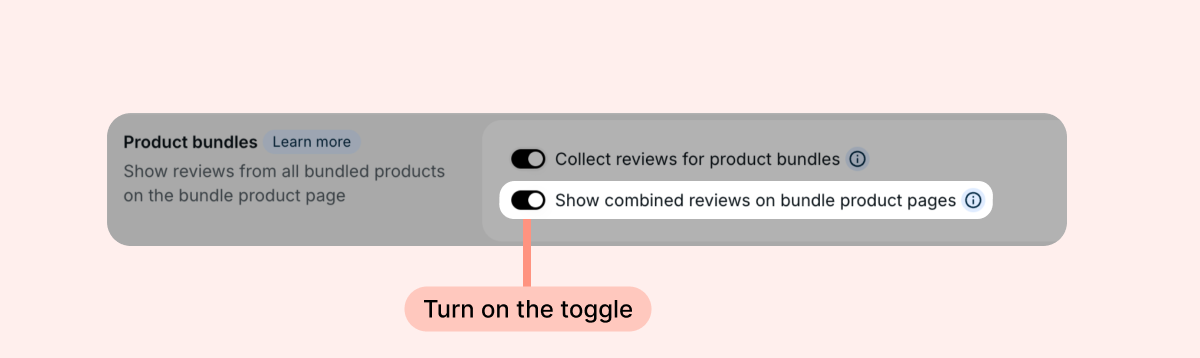
Once the toggle is on, Loox will automatically start aggregating reviews on your bundle pages. No additional configuration is needed.
Note: When you turn the toggle on or off, the widget cache clears so the change takes effect on the next page load.
Troubleshooting
Reviews are not showing on my bundle page
Check that:
- The bundle toggle is turned on in your Loox admin
- Your bundle was created using Shopify's native Bundles feature or an app that uses Shopify's native mechanism.
- The child products in the bundle already have published reviews in Loox
If Shopify does not recognize the product as a bundle, the page will display that product's own reviews only - exactly as it would without the toggle.
My bundle page shows an empty state with no reviews
If none of the child products have any published reviews, the bundle page will fall back to the default empty state. This may include store reviews, depending on the settings defined in your Reviews Widget's live editor.
FAQs
Q: How is this different from Product Grouping?
A: Product Grouping syncs reviews bidirectionally across grouped products - all products in the group show the same combined review count. Bundle review aggregation is one-directional: reviews from child products appear on the bundle page only. The individual product pages remain unchanged.
Q: What if I have both Product Grouping and Bundle review display set up at the same time?
A: Product groups take priority - so if you have both set up, the product groups will be the ones displayed on your product pages, not the bundled reviews.
Q: Can I collect reviews for the bundle as its own standalone product (not just for the individual products inside it)?
A: Yes. Turn on the Collect reviews for product bundles toggle, and customers who buy a bundle receive a single review request for the bundle itself.
Q: What if I have AI Review Summaries set up on my Reviews Widget- how will that interact with a product bundle page?
A: Good news! AI Review Summaries support product bundles, and will reflect the collective reviews of all child products in the summary.
Q: Do I need to configure anything inside Loox for each bundle?
A: Nope! Loox reads the bundle structure directly from Shopify when rendering widgets. As long as the "Bundle" toggle is on and Shopify identifies the product as a bundle, aggregation happens automatically.
Q: Can customers leave a review directly from the bundle page?
A: Reviews for bundles are collected through review request emails, as the "write a review" button is hidden on bundle product pages. When you enable the Collect reviews for product bundles toggle, customers who buy a bundle receive a review request for the bundle itself. Otherwise, requests are sent for the individual child products, and reviews submitted for child products are grouped on the bundle page (when the “Show combined reviews on bundle product pages” setting is toggled on).
Q: What happens to individual product pages when the toggle is on?
A: Nothing changes on individual product pages. They continue to display only their own reviews.
Q: Which bundle apps are supported?
A: Shopify's native Bundle feature is supported, as is any other app that uses Shopify's native mechanism. Bundles built with apps that use a cart-transform feature will not be recognized Bundles built with Shopify's native Bundles feature are supported. If your bundle app does not use Shopify's Cart Transform, Shopify will not identify the product as a bundle and aggregation will not apply.
Q: What happens if I update the contents of my bundle in Shopify?
A: Loox reads bundle structure when rendering widgets and caches the result. If you change what's inside a bundle in Shopify, the updated structure will appear on the next page load after the cache refreshes.
Q: Will this affect my star ratings on individual product pages?
A: No. Individual product pages continue to reflect only their own reviews and ratings.
If you have more questions, contact our Support team. We're available 24/7 and happy to help!