
Collecting reviews for product bundles is available on the Convert, Unlimited, and Legacy Scale and Growth Plans. Click here to upgrade your plan.
When a customer buys a product bundle, Shopify records the individual child products inside it, so review requests are sent for each of those products - and the bundle itself never collects reviews of its own. If you want your customers to review the bundle as a whole, Loox can do exactly that: turn on one toggle, and customers who buy a bundle receive a single review request for the bundle itself.
This article covers how to turn on review collection for bundles, what your customers see, and how to track bundle review requests.
Why collect reviews for your product bundles?
- Customers who buy a bundle are asked to review the exact bundle they actually bought, so your bundle page builds social proof of its own
- Shoppers visiting the page will see feedback about the bundle as a whole instead of feedback about each of the individual products inside it
- Your customers receive one review request for the bundle instead of a request for every product inside it
How to collect reviews for your bundles
In your Loox admin, go to Collect reviews > Preferences > Product groups & Bundles:
- Turn on the Collect reviews for product bundles toggle:
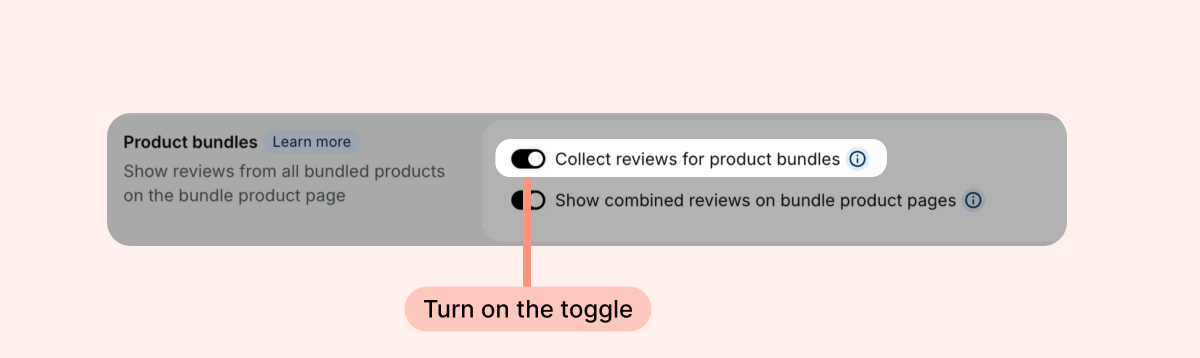
That's it! Once enabled, Loox creates a single review request for the bundle when a customer orders a bundle instead of separate requests for each of the child products inside it. The review request email, reminders, discounts, and custom questions all work exactly as they do for any other product.
Note: The setting only applies to orders placed after you turn it on. Review requests that were already triggered for existing orders won’t be changed.
How bundle review requests work
- One request per bundle. A bundle purchase creates a review request for either the bundle or its products, depending on your settings
- Orders with more products behave as usual. If an order includes a bundle and other products, your customer receives one review request email covering the bundle and each of the other products
Tracking your bundle review requests
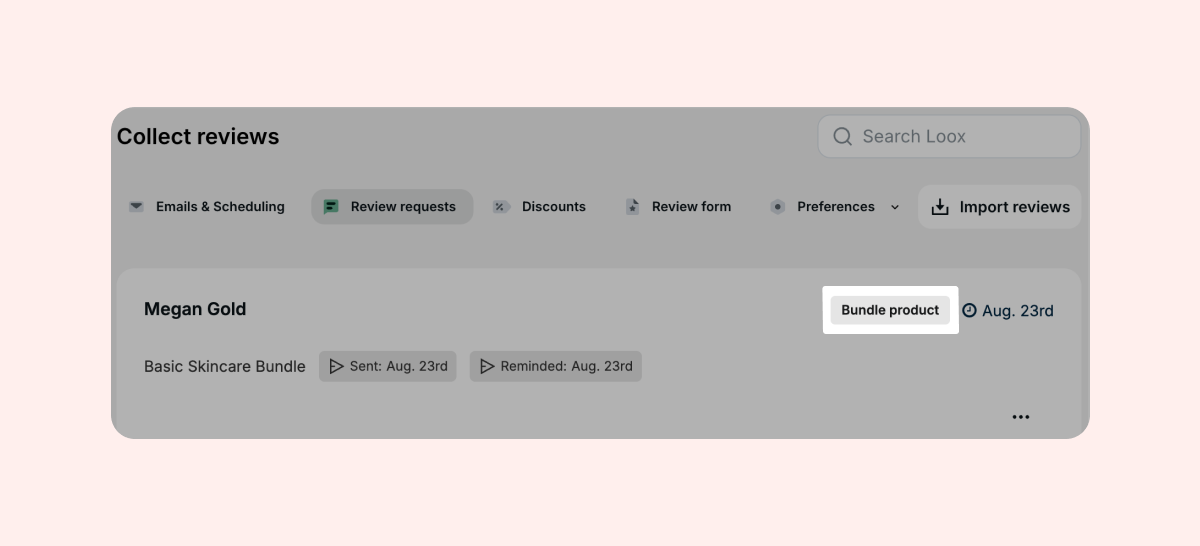
Review requests for bundle products appear on your Review requests page like any other request. Orders that include a bundle are marked with a Bundle product label.
Good to know
- This setting controls review collection only. To also show the reviews of the individual child products on the bundle page, turn on the Show combined reviews on bundle product pages toggle - the two settings are independent, and you can use either or both. Learn more about displaying reviews on product bundles
- Loox recognizes bundles built with Shopify's native Bundles feature, as well as bundles from any app that uses Shopify's native bundle mechanism
- If Loox can't identify the bundle in an order, your customers receive review requests for the individual products in it, so a bundle purchase always has a fallback review request mechanism
- If you send review requests through Klaviyo or Omnisend, the review request trigger reflects the bundle product as it would in Loox
FAQs
Q: Will my customers get review requests for both the bundle and the products inside it?
A: No. A bundle purchase creates a review request for either the bundle or the products inside it, based on your settings.
Q: I just turned on review collection for bundles. What about orders my customers already placed?
A: The setting applies only to orders placed after you turn it on. Review requests that were already created can't be changed.
Q: Where do the reviews my customers leave for a bundle appear?
A: On the bundle's own page, like any product review. If you also display combined reviews on your bundle pages, these reviews appear together with the reviews of the bundle's child products.
Q: Can I send a manual review request for a bundle?
A: Yes. The bundle appears in the manual review request product picker like any other product.
If you have more questions, contact our Support team. We're available 24/7 and happy to help!