
The Loox + TikTok shop integration is available on the Convert Plan and up for US stores only. Click here to upgrade your plan.
Leverage Loox to showcase authentic customer reviews directly on TikTok Shop. By syndicating verified reviews from real customers, you can build brand trust, credibility, and engagement with your TikTok audience through genuine customer experiences.
Why use the TikTok Shop integration?
Using your existing Loox reviews helps you grow sales on TikTok Shop. With this integration, you can:
Reuse social proof you already collected with Loox
Keep your brand experience consistent across Shopify and TikTok Shop
Help shoppers feel confident to buy with real reviews and photos from verified customers
Runs a daily continuous sync with no manual work required
Before you start
If you have already synced your Shopify products with TikTok Shop via the TikTok for Shopify app, you can skip ahead to activating the integration.
Note: The product sync must be done via the TikTok for Shopify app specifically. If your products are connected to TikTok Shop through a 3PL or other third-party integration, Loox will not be able to reliably match reviews to the correct products. This is because Loox uses Shopify product IDs to identify products in TikTok Shop - these IDs are only embedded in TikTok Shop when synced through the official app.
Loox uses your product IDs from Shopify as identifiers to help sync your reviews to TikTok. To ensure reviews sync correctly, your Shopify products must be synced to TikTok Shop before activating the integration.
To automatically sync products between Shopify and TikTok Shop:
- Install the TikTok for Shopify app from the Shopify app store.
- Follow the instructions to connect your Shopify account and sync your products to TikTok Shop.
How to activate the TikTok Shop integration
Once you have synced your Shopify products to TikTok Shop, open your Loox admin.
Within "Integrations", go to "TikTok Shop" and click "Manage".
Click “Activate integration”.
Confirm the following:
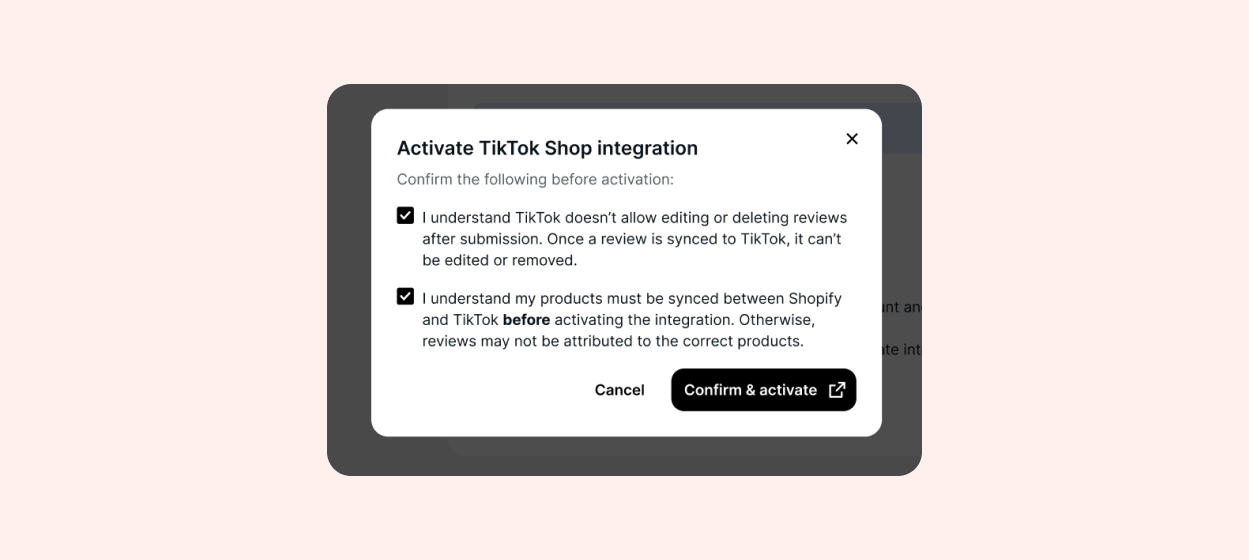
Note: Products must be synced to TikTok Shop via the TikTok for Shopify app before activating the integration. Syncing through a 3PL or third-party tool is not sufficient. Otherwise, reviews may not be attributed to the correct products.
Click “Confirm & activate”.
Approve Loox access in TikTok Shop.
Back on the Loox setting page, select whether you would like to sync Shop App reviews to TikTok.
That’s it! Your initial review sync will start automatically.
Note: The initial sync can take up to 48 hours. During this time, you'll see a Pending label. Once the sync finishes, it changes to On. Read more here.
How Loox syncs reviews to TikTok Shop
Loox runs a daily sync for all merchants who have activated the TikTok Shop integration.
There are two sync types:
Initial sync: Runs right after you activate the TikTok Shop integration. The initial sync can take up to 48 hours.
Ongoing sync: Runs automatically every 24 hours to send newly collected reviews. Previously synced reviews will not be reprocessed during the ongoing sync.
Sync status
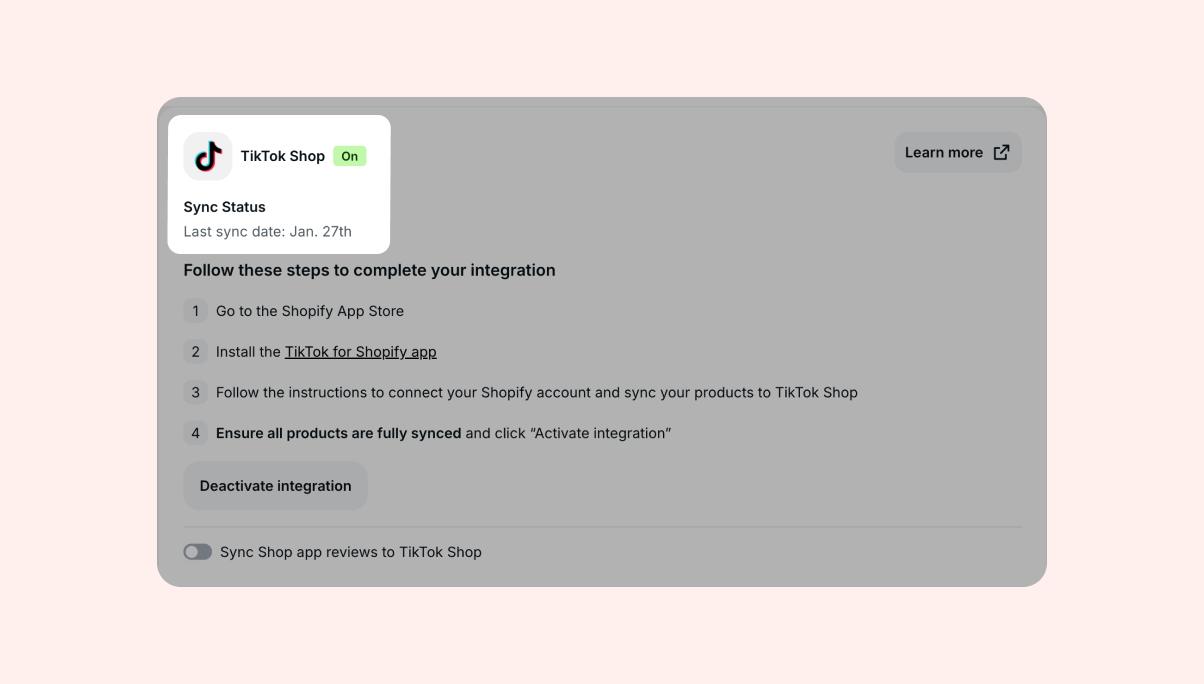
You'll see one of the following statuses in the TikTok Shop integration page:
Pending: The sync is in progress.
On: The sync is running successfully and shows the last sync date.
Error: The sync stopped due to a connection issue. Reconnect your TikTok Shop account to resume syncing reviews.
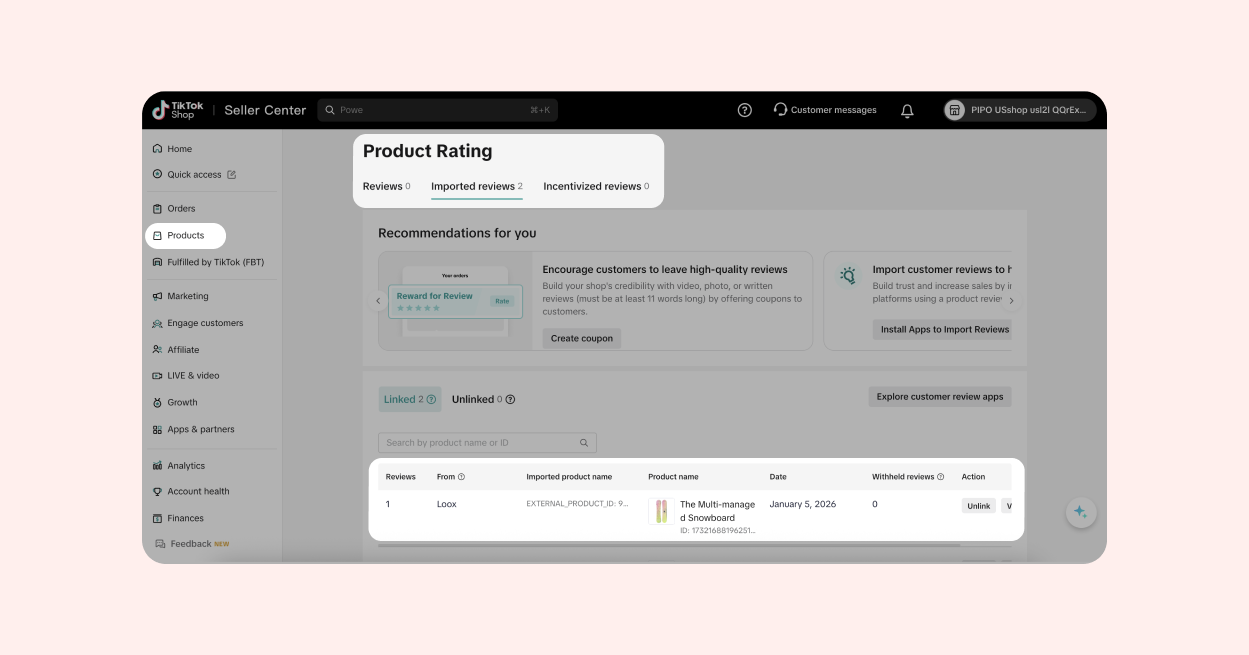
 To view synced reviews:
- Log in to your TikTok seller center
- Open the "Products" tab
- Go to "Imported reviews" under "Product Rating"
Which reviews sync to TikTok Shop
Reviews that meet TikTok Shop's requirements and are matched to products in your TikTok Shop are synced, including reviews that are approved, pending, or hidden.
Eligible reviews include:
Product reviews (not store reviews)
Verified reviews that are linked to a Shopify order (included verified reviews that were imported from a previous source)
Reviews linked to products that exist both on Shopify and TikTok Shop
Reviews where the reviewer didn't receive an incentive for submitting their review (e.g., free product)
Shop App reviews that are synced to your Loox account (make sure to activate this manually from the TikTok integration setting page in your admin)
Photo reviews
Note: TikTok may filter or remove reviews even after Loox syncs them to your TikTok Shop, based on their content policy.
Review limitations for TikTok Shop
TikTok Shop applies strict guidelines on which reviews can appear on product pages. Loox will only sync reviews that meet TikTok's technical requirements.
Reviews that won't sync to TikTok Shop include:
Store reviews
Video reviews
Reviews with photos larger than 30 MB each
Incentivized reviews
Reviews longer than 5,000 characters
Reviews where the reviewer's name exceeds 32 characters
Imported reviews that aren't connected to a verified Shopify order (imported reviews that come from a verified source can be syndicated to TikTok Shop):
FAQs
Q: What happens if a customer edits their review after submission?
A: TikTok Shop doesn't allow editing or updating reviews after they are synced. This means:
- If a reviewer edits or removes their review in Loox, the original version will remain visible on TikTok Shop.
- If you change the product attached to a review in Loox after it has synced, it will remain attached to the original product in TikTok Shop.
Q: Can I choose which reviews to send to TikTok Shop?
A: No, Loox automatically syncs any eligible review that meets TikTok Shop's criteria. TikTok Shop ultimately controls which reviews appear based on its content policy.
Q: How often does Loox sync reviews?
A: Loox runs a daily sync for all merchants with the integration turned on and also runs an initial sync right after you activate the integration, which can take up to 48 hours to complete.
Q: What happens if you uninstall Loox or deactivate the TikTok Shop integration?
A: Loox will stop sending new reviews to TikTok Shop. Reviews that are already synced stay visible in TikTok Shop.
Q: Will I need to reactivate the integration if I reinstall Loox?
A: Yes, you would need to reactivate the TikTok Shop integration after reinstalling. Loox will then run an initial sync for eligible reviews that were not synced previously.
Q: How does Loox identify if an imported review is verified (so it can be included in the review feed that's sent to TikTok)?
A: If an imported review contains a Metaobject ID, Order Id, and is marked as verified by the origin source, Loox recognizes it as a verified review that can be included in the review feed that's synced to TikTok.
Q: Will removing reviews from Loox also remove them from TikTok Shop?
A: No, any previously synced reviews will remain visible on TikTok Shop even if removed on Loox's end. This also applies to Shop App reviews- once you've started syncing them to TikTok, those reviews cannot be removed at a later time. For TikTok Shop-related errors, please contact [email protected].