
Loox automatically emails your customers after each order to ask for a review. You choose when these emails are sent, how they look, and whether customers get a discount for adding a photo or video.
This article covers how review collection works, email timing and design, photo and video discounts, and other ways to collect reviews.
How review collection works
For each order, Loox runs the same automatic flow:
- Review request: Loox asks the customer to review the products in their order. The customer rates the product, writes a few words, and can add up to 5 photos or 1 video.
- Reminders: If the customer doesn't respond, Loox sends up to 2 reminders.
- Thank you email: Loox thanks the customer right after they submit their review.
- Photo/video reminder: Loox invites customers who left a text-only review to add a photo or video.
Review requests and reminders are sent during each customer's local work hours.
When review requests are sent
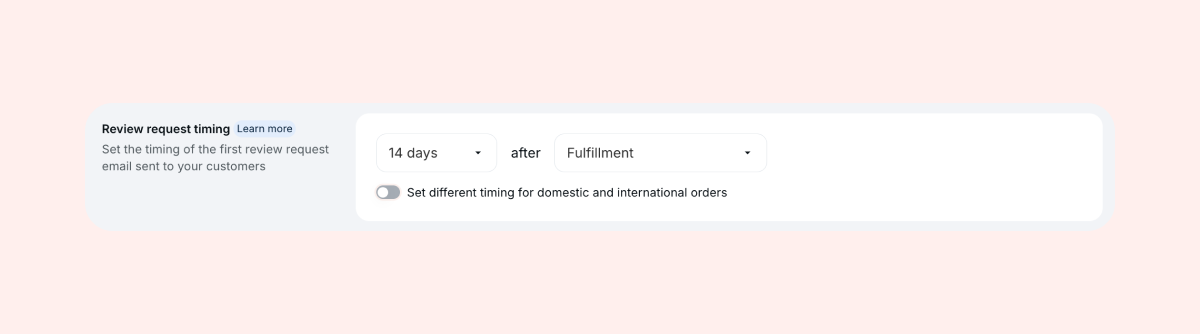
By default, the review request is sent 14 days after an order is fulfilled.
To change it, go to Collect reviews > Emails & Scheduling. Under Review request timing, choose what starts the count, then set 1 to 70 days:
| Option | Best for |
| After purchase | Digital products or same-day delivery |
| After fulfillment | Stores that fulfill orders in Shopify |
| After delivery | Stores whose carrier or tracking app sends delivery updates to Shopify. You can also set a fallback timing in case a delivery isn't reported. |
By default, the first reminder goes out 1 day after the review request, and the second 7 days after the first reminder. To change the timing, click Edit next to Review request reminder on the same page, then open Preferences.
- If you sell internationally, you can turn on Set different timing for domestic and international orders to give international orders more time to arrive. Learn more
- Not ready to start? Set Review request timing to Never to pause all review requests and reminders
Customize your emails and review form
To match the default email and review form to your brand:
- Review request email: Edit the subject line, text and button under Collect reviews > Emails & Scheduling > Review request
- All Loox emails: Set your banner, colors and font once with the Global email style designer
- Review form: Change its colors and text, and turn on video reviews (Convert plan and up), under Collect reviews > Review form
Offer a discount for photo and video reviews
A next-purchase discount encourages customers to add a photo or video, and to shop with you again. Visual reviews can convert up to 91% more than text-only reviews.
- In your Loox admin, go to Collect reviews > Discounts.
- Turn on Enable discount for photo and video reviews.
- Choose the same discount for photos and videos or a different one for each, then set a percentage or a fixed amount.
- Click Save.
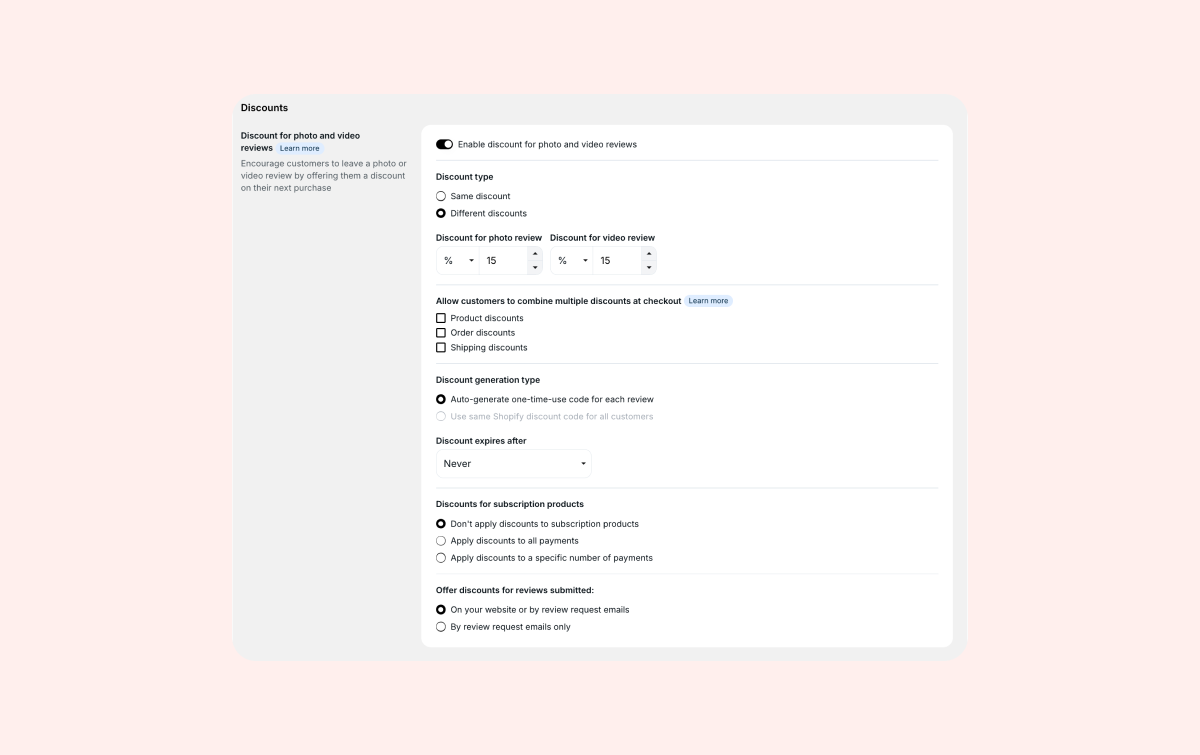
Customers get their code in the Thank you email, no matter what rating they give. If they don't use it, Loox will send them a reminder on this as well. For more settings, like a single Shopify code or a collection limit, see Offering a discount for photo/video reviews.
More ways to collect reviews
To collect more reviews, especially when you're just starting:
- Bonus emails: In your first 90 days with Loox, send free review requests for orders placed in the 90 days before you installed
- Manual review requests: Email a review request to up to 100 people at once, for up to 5 products
- QR codes and review links: Add them to packaging inserts or receipts. Customers enter their email and get a review request for their latest order
- Klaviyo: Send review requests and reminders through your own Klaviyo flows. Available on the Convert plan and up
Good to know
- Excluding products, customers or orders: Add the NOREVIEW tag in Shopify to any product (like shipping protection), customer or order you want to exclude. Tags only affect orders placed after you add them
- Repeat customers: Turn on Skip review requests for products customers already reviewed under Collect reviews > Emails & Scheduling, so customers aren't asked to review the same product twice
FAQs
Q: How many review requests can I send each month?
A: Up to 2,000 a month on the Beginner plan, including manual review requests. Emails over the limit wait until your billing cycle resets, and emails that wait more than 30 days aren't sent. The Convert and Unlimited plans have no email limit. Other emails, like reminders and bonus emails, don't count toward the limit. Learn more
Q: Does a customer get one review request for an order with several products?
A: Yes, as long as the products are fulfilled together. If they're fulfilled on different days, each fulfillment gets its own review request.
Q: Why didn't a customer get a discount for their photo or video review?
A: The most common reason is that they didn't agree to marketing emails at checkout. These customers get a transactional review request, which doesn't include a discount. Learn more
If you have more questions, contact our Support team. We're available 24/7 and happy to help!